And of course that error code just means “there was an issue with the store” WOW THANKS SO MUCH DETAIL TO GO OFF OF
Technically the numerical code still gives you a precise search key to find other people discussing the same issue.
… You know, as would be useful for a serious operating system where online support doesn’t mean trawling the bowels of Reddit praying somebody’s had the same issue and found a reproducible solution.
Hello I’m a 12 year Microsoft MVP and Certified independent advisor here to help.
Please type “CMD” into the start menu then type “ckdsk /f /r”
If this solved your issue please click on “Accept as solution”!
Unrealistic. Every repair on Windows starts with
DISM.exe /Online /Cleanup-image /Restorehealthfollowed bysfc /scannow…wait. no… That’s the correct way. The MS MVP in the forum always mix it up and tell you to run them in reverse…
Fyi do not run that if you used MAS :-)
Why would you use anything else.
Because Linux exists :p
I know, but people are still not comfortable switching to it, but it’s getting more traction because Windows 11 is getting worse and worse, not that it was great before, this is just the shittiest version of it and people are finally realising Linux is a good alternative.
what will happen?
I think it removes some needed files and screws up your activation or something like that
The one time I used that official forum I did my due diligence and laid out what I ended up doing to solve my problem as well as responding to the other person with a similar one. I am not DenverCoder9.

Except the code covers SUCH a vague issue that it’s useless. Not very precise when any issue with the store gives you the same code. Maybe it couldn’t find a DNS record for the online store. Maybe its local db is corrupt. Maybe it’s been locked out administratively. Doesn’t matter which root cause, same error code, so it’s not a “precise” error code.
These may not be the case in this instance, but in many, many other instances, it sure has been
“Question: I am getting error with code 0xblahblahblah. How to fix?”
“Deleted response”
Reply 1: “Youre a life saver mate, thank you.”
Reply 2: “I would kiss you if you were here”
Reply 3: “Absolute legend, this fix is so obvious, thank you for pointing it out!”
The problem is that “the same issue” here means “there’s any error at all with the MS Store”. Any discussion about there will be useless.
That key is probably the same for all store issues
“Solved it, I will DM you the solution.”
This is the only part I despise of forum culture like MDL or the likes.
If you have a solution, or even better: if you have written software or a guide for this, please just publish it online.
What I hate is when I find a solution for some old post but it’s locked because “you should just make a new question” well FUCK YOU BECAUSE SEARCH ENGINES GO THERE AND I HAVE THE ANSWER AND I WANT TO HELP PEOPLE! BUT FUCK ME I GUESS 😭
It feels like a bunch of moderation decisions are made by people just trying to satisfy some arbitrary OCD-like requirements. Like “you can’t reply to an old conversation” or “you can’t talk about a problem someone has already talked about”. That stuff is worse than the people who reply useless shit like RTFM (aka “I go to helo forums not to provide help but to gloat about the things I know that you don’t and act like every single comment is addressed to me personally and needs my input”) because at least those useless comments don’t kill the rest of the conversation.
Yeah, a lot of upholding the letter of the law instead of the spirit of the law as well as following rules without really critically evaluating why they’re rules in the first place. (Example: Answering an old thread should be fine, but folks just view it as bad and lock them.)
I have copied down and manually typed out numbers like that many times when using windows. I’m not sure it ever once helped me in the slightest.
It’s infuriating that you can’t just copy the text in those sometimes
Tends to be as helpful as those windows saying “We are looking for a solution to your problem online”
Haha yes those dialogs never helped me either.
I think the windows connection help wizard might have actually fixed a connection issue I had once. Out of more chances than I probably should have given it, considering how often it did dick all, despite my phone’s connection being fine.
I think there’s a rare race condition or something in the windows network stack because I’ve had four different machines suddenly lose the ability to connect to working networks, where sometimes toggling airplane mode would fix it, sometimes even that wouldn’t do anything and it needed a restart. It happened more often with wireless connections, but I’ve seen it affect wired ones, too.
Windows net stack sucks so hard.
And if you look up tech support on this, it’s all unrelated nonsense tips. Even in the official sources it doesn’t go much beyond turn it off/on, reset the settings, reinstall the app or reinstall the OS. While this might “solve” stuff, it doesn’t fix the core issue and the issue might re-occur without a fix. Why go through all the trouble of wiping and reinstalling, if there is often a very focused and simple fix that truly solves the issue. But Microsoft has started making it harder for users to have ownership over their systems for years now. Keep your users dumb, then you can control them.
Steps to reproduce
Open Terminal
Expected Behavior
It would be pretty nice, if the terminal would open
For what it’s worth, only one of my two systems is experiencing this issue.
The one with the issue is running windows 11, and the working system is running Linux.
Priceless.
LMAO the next action taken after that comment:
microsoft locked and limited conversation to collaborators
Marked as offtopic as well xD
deleted by creator
Oh my god that is hillarious
What a joke
Its a work device so I’m signed in like a good little corporate peon, still they manage to fuck it up.
Then your IT has blocked use of the terminal and store for your account.
Which makes sense for regular users to reduce the chance of fuck-ups and rise of a shadow IT.
This isn’t a Microsoft issue (except for the slightly unspecific error message).That’s an assumption
I’m a Windows sysadmin, this is the exact explanation. The only other thing, and this is going way out on a limb, is that terminal was installed through the Windows Store and something related is busted. I’ve never even heard of a company utilizing the Store for installations.
Others have already provided links to the GitHub issue detailing this bug and a Microsift employee confirming this indeed seems to be a micrsoft error although another team than the terminal one as it also affects multiple other programs such as the screengrab tool and notepad.
One of those comments can be found here: https://lemmy.dbzer0.com/comment/23913723
Not really. Today at work that error appeared to me. As a software developer of course I have access to terminal, I use it every day.
I just closed the message and opened the terminal again, and it worked.
This is Microsoft’s fault, not any other’s.
What do you get when your search “terminal”? My home rig defaults to PowerShell, but I likely changed something years ago.
The terminal
In a previous company, they roled out their update every few months. Every time, it closed all the ports we need to actually work. Make ticket, wait until IT got around to it, tell people no connection means no work. Those were the days to update documentation.
God where do you people even come from? Coming out of the woodwork to free-associate about some incompetence of an imagined IT department when Microsoft fucks up this OS every other day and when Teams and Sheets Web (or whatever the M$ version of Google Sheets is called) and Windows 11 is the way it is.
OP’s company has good opsec.
Could be part of an ISMS framework for ISO 27001, too. Just went through the latest round of audits at my workplace, with SOC 2 and ISO 27001 being the most recent. Think I aged 15 years this time around.
Its possible the IT admin misconfigured, but blocking the terminal or the store would not make sense at this company since most employees need them on a daily basis.
Update: most definitely a microsoft issue https://github.com/microsoft/terminal/issues/19764
Never! Couldn’t possibly be M$’s fault! It’s definitely somehow your IT department!
I mean, it is.
They should have used Linux.
/s
Beautiful bug report
Expected Behaviour:
It would be pretty nice, if the terminal would open
That’s definitely an issue with your IT department. My work Windows laptop came with the terminal accessible.
I mean I was able to open the terminal just fine a few hours ago
Maybe they’ve updated their security policies? Could be to prevent users from installing unapproved software via winget, etc.
I have definitely never done that myself, if anyone asks …
God where do you people even come from? Coming out of the woodwork to free-associate about some incompetence of an imagined IT department when Microsoft fucks up this OS every other day and when Teams and Sheets Web and Windows 11 is the way it is.
It’s a MS issue, not isolated
Yea and Usain Bolt can run real fast and you can’t
You got problems buddy
“Get help with this”
The real joke.
I had a similar error with a different application. Clicking “Get help with this” just opened the Documents folder in Explorer.
Did it help?
I’d guess the dialog was written by an AI that was never told to go implement the help function, but I know that the automated help or button to find help online rarely worked before AIs were capable of doing much of anything with code. Though odds are the broken non-AI help buttons were replaced with broken AI help buttons that were trained using the original broken code.
It’s always a link to a microsoft support page that lists one question some guy had three years ago with 5000 “I also have this problem” checkmarks and a single answer from an unpaid MS mod that basically tells you to restart your computer and then marks the question answered and permanently closed.
99% of people just use their OS as a browser frontend. They don’t care about freedom, privacy, security, etc. They will just use whatever OS comes pre-installed. Thats why Linux’s greatest success on the desktop/laptop market as been ChromeOS. Not because it’s any better than Pop_OS!, Debian, etc. It’s literally just that ChromeOS comes preinstalled.
Yeah that makes a lot of sense. Still, I’ve had so many “last straw” moments with Windows that would make me consider Linux even if I was not familiar with it at all. It baffles me that there are relatively few people who give it a shot.
I suppose a lot of people just don’t want to or don’t have time to learn something new.
I’ve hit my last straw moment today trying to remove the setting forcing my password to change on a laptop that I fucking own. Windows 11 has disabled pretty much all user management features of local accounts now unless you’re signed into Microsoft and link your accounts.
Fucking bullshit.
I just need a spare weekend or two to make the swap now and throw wine on it for the games I play that refuse to run on Linux.
I just need a spare weekend or two to make the swap now and throw wine on it for the games I play that refuse to run on Linux.
if your primary storefront is via steam, you likely won’t even need to manage wine, steam will do that for you as part of the install process. You can use something like protonup or something to get GE editions of proton but, honestly it mostly works right off the gate.
Just be aware that proton can have conflicts if you try to use it on NTFS drives, you’ll need to manually specify UID and GID for the drive (via fstab or however you manage mounting drives) or you’ll get permission errors that won’t actually say what they are unless you ran steam via the terminal.
Unfortunately the games I’d need wine for don’t run through steam and have their own launchers ☹️
But good to know for my steam library at least.
There’s a high probability that it will work if you simply run the launcher through steam. Honestly it’s impressive what you can throw at it and it just works ™.
Only thing to look out for is the installation path when you run installers that way, with all the virtual filesystems and stuff. Haven’t encountered a single game that didn’t run since the switch, be it pirated, gog or steam
Try Lutris or Heroic Launcher as those two wrap around Wine (and everything else needed to run Windows games in Linux, such as DXVK) and manage the whole process for you, with only a few games which might need tweaking the config to run (and the fraction of games like that is no worse there than it is in Steam).
I use both Steam and Lutris and in my experience Steam is not at all a good launcher for anything other than games from the Steam store, mainly because it is less configurable and because it doesn’t directly expose the tools you need to use to fix those few games that won’t just run and limits the launch options you can tweak, whilst Lutris follows the Unofficial Open Source Credo of pretty much making it possible to configure everything (though Lutris specifically defaults to the best configuration for each game, but it definitelly gives you more than enough rope to hang yourself with)
Steam is very popular because of the Steam Store market dominance so tons of people swear by it (never having used anything else), but it’s not actually the greatest option for anything but steam games and even for those, sometimes it’s worse that getting the same game from GoG and using Lutris or Heroic, mainly because the DRM in the non-GoG version of some games interferes with running them in Linux.
I want to add onto this that if you’re choosing between Lutris and Heroic, you should probably go heroic. I personally use Lutris myself, Mostly because I prefer the UI design of it. However, heroic does have a faster update cycle, while having built in support of Amazon gaming, epic games(including experimental cloud support) and gog, and doesn’t have the bugs that Lutris has. Especially when it comes to trying to run GE layers through it.
Trying to get those first party storefronts to work on Lutris is, for lack of better words, a pain in the ass. I’m only still using it out of pure stubbornness because, like I said, I much prefer the overall layout.
No need to figure out WINE. Steam will figure it out for you. Just click the Play button.
Linux today is VERY different from Linux 10 years ago. The switch won’t take a whole weekend like it did for me when I first tried Linux many years ago. Just install something like Linux Mint (the most user friendly and stable Linux distro) and the set up will be as easy as something like windows or macos. You never have to touch the terminal if you don’t want to.
Don’t use Wine directly, just use launcher UIs, such as Steam for Steam store games and Heroic Launcher or Lutris for games not from the Steam store.
You do need Wine installed, but if you use launchers you don’t actually need to figure Wine out or manage it to install and run the vast majority of games unless you’re doing unusual stuff like running pirated games.
When my ex’s grandparents needed a new computer I got them a chrome OS all in 1.
When I started dating her in 2013 her parents were paying for AOL like $25 a month. They also had cable Internet. Saved them like $1500 on paying for AOL because they thought they needed to pay to access the email.
It’s true that most people just want instant on functionality with no need for major changes beyond colors and backgrounds. Totally fine too, for many that’s all they need. But as a “power user”, which would mean anyone that needs more than a portable browser, I was very disappointed to find that’s all that ChromeOS is (twas a used one in the family). And then when I researched putting actual Linux on it so it could do more… good god they locked that shit down hard. Not even worth that rabbit hole. And that was the intent of Google.
Most chromebooks can be put into a dev mode(which requires factory reset…) in order to install a new OS on it. I have done it a few times.
being said, with how low power they are, they can’t really do much but what chromeos can do.
The early ones were easier. The one I had needed to do some mess with a grounding screw and some other stuff that I forgot (there are websites dedicated to the procedure guidelines and which requires what), and like you say, it’s not going to be able to do much anyway. Such a contrast with throwing Kubuntu on an old MacBook, and 10 minutes later it was better than new.
there are some gems though that are more capable. some are worth installing linux onto
So the power user uses Linux.
The casual user uses ChromeOS (shitty Linux). Or preferably something like Pop_OS!, but I’m being unrealistic with this.
I see no problem here. You could replace pretty much everyone’s pre-installed OS with ChromeOS or Linux (or macOS I guess if they like MacBooks) and I don’t think most people would mind.
I have only ever seen someone use windows because they HAD to, not because they want to. Either they game, they use a software only on windows, it came pre-installed on their laptop and they don’t know or can’t bother to learn how to flash an ISO on a USB stick, etc.
I am completely fine with, and in fact am grateful for, the enshitification of windows 11. It will push more and more people to Linux. The enshitification of windows 8 is what made Steam shift from windows to SteamOS. I’m sure future enshitification will do just that: make people question why they are using windows in the first place.
Don’t sign into Windows with an online account. You can still do offline only accounts and it fixes this problem. The Microsoft Store still works too but IDK why you’d use that.
The funny thing is I’m perfectly happy with Windows 10 LTSC and if it was available without a corporate license, I would have happily paid for it. MS execs are their own worst enemy.
Microsoft has admitted to breaking this. https://www.windowscentral.com/microsoft/windows-11/windows-11-apps-like-notepad-arent-loading-what-is-error-code-0x803f8001-and-how-d
not really. windows terminal can run several kinds of shells, and last I used it powershell wasn’t even the default one
Yeah, What was the default one?
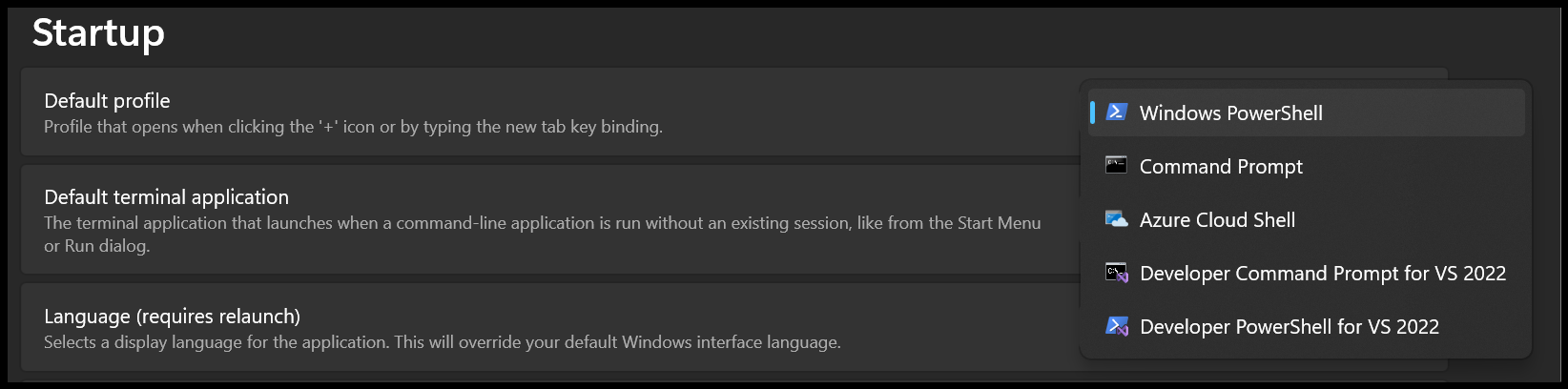
why, did it change from the traditional command prompt?
if it did, that’s on me, but with several other shells supported (one of them a cloud service, a shell on a remote system) it does not make sense that a disabled powershell also disables the whole terminal app.
Windows Terminal is a fairly new application. It came along around 2020 and launched with powershell 7 as its thing, in an attempt to drive people away from the old command prompt and to start using powershell. It probably always supported command prompt and other alternative terminal applications, but Microsoft has been trying to put powershell everywhere for a while. I think the Mac and Linux rollout was 2018?
Command prompt is still there but I imagine at some point it’ll just run command prompt commands in powershell instead if it isn’t already doing something like that already.
Both parts of this post are incorrect.
Terminal is an “app” that merges Command Prompt and PowerShell. And is the way Microsoft intends they be used, appearing on the Win+X power user menu, or even just from the Start Menu in the first place.
This is a Microsoft problem. They’ve admitted it. Source: http://web.archive.org/web/20260122062054/https://github.com/microsoft/terminal/issues/19764
Nah, this is definitely Windows being Windows: https://www.windowscentral.com/microsoft/windows-11/windows-11-apps-like-notepad-arent-loading-what-is-error-code-0x803f8001-and-how-d
They even managed to break Notepad!
office 365 subscription is all tech support offers these days.
not just use, people still pay for this shit
I prefer Windows 10 and Linux. Seriously!
I know it’s insecure, but I’m a Windows 10 holdout on my desktop. I allowed 11 on my shitty travel laptop and performance went way down. I’ll probably wipe it and dance with Linux again.
Moments like this are why people get frustrated—tools should get out of the way, not add extra hoops. Everyone’s setup works… until it suddenly doesn’t.
Alternatively,
Installed POP OS. Connect the Nintendo switch to my laptop using MTP. Double click the file folder. Crashes.
Decide to just reset to see if it would fix it. The laptop loops at the authentication screen infinitely. Used a PC to transfer files instead.
Reformat and install Fedora Workstation since Lenovo ships with it. Installed Anydesk and Rustdesk and Wayland is extremely laggy and the hot keys do not transfer to the remote computer.
I think my next step is to install an xorg OS.
If you are looking for a gaming distro then try out Nobara Linux
For gaming u gotta use sunshine moonlight or whatever they called. But that requires more fucking around with than I care
Fedora has built in rdp server. That’s what I use. Laggy? Ya dude that’s for office work, don’t push more than 1080p, yes it’s still gonna be inperfect
That combination of errors sounds suspiciously like hardware problems.
MTP crash, unexpected but not overly so, it’s old code. Authentication issues post reboot on error is super sus.
Wayland can be a little slow, but it seems to be ok for all of my ancient candidates. Keymaps kind of expected, that’s the kind of stuff that wayland is actually not great at yet.
Put that all together, I’d say you have something going on with the box.
It’s not hardware. Fedora workstation worked for the MTP.
I have multiple computers connections at once using Anydesk and Wayland is basically broken. Alt tab never transfers to the remote computer.
I love how every comment tells you to use a different distro lol. Don’t you guys see problem? You cant ask people to change their distro for every issue they stumble upon.
I see exactly one(1) comment that suggests trying a different distro.
One comment is suggesting using a game streaming application (Moonlight).
One comment is suggesting using the RDP server that comes with Fedora (which jaschen306 stated they are using).
One comment is yours.
One comment is saying it’s probably a hardware issue.
And finally, one comment is suggesting a gaming-focused Linux distro - but specifically calling out that it’s if they’re looking for a gaming distro.
Admittedly I have Hexbear and Lemmygrad blocked, so I might be missing other comments.
And everyone telling dear reader to change distros is doing it from a position of ignorance.
Even the least reliable of those distros should not be seeing anything but the keymap issue. MTP crash, unable to login afterward, That reeks of ram/disk issues.
Out of the 4 comments other than yours, there are exactly 2 that recommend using a different distro.
I recently tried to install librewolf onto a W11 machine from the windows store. It won’t even launch that. Not even an error or nothing just gone.
if it helps, I installed it today using winget which I liked.
don’t use the windows store, when not required you can never know what else they package into your apps. google and amazon’s android app stores do this, the latter is even open about adding tracking libs to apps
Well that’s the thing, it’s a pc I’m required to use and it got everything else behind administrators password if you catch my drift. (If I had my way it would be Linux)
For now I’ll have to make due with a ff that I tweak by hand where I can.
Don’t be too mean, but make sure your admin feels the heat.
Linux is good enough for the desktop for a fuckton of businesses. gentle pressure may get us there in a generatiohn or two
The Microsoft Store is impressively bad. So many random errors that don’t give any helpful information that are impossible to fix.
Installed Vivaldi and Brave from the MS Store on work laptop from the official pages. Got a Trojan in each that IT had to remove. Yeah no
Couldn’t install iTunes because my clock was wrong. That certainly wasn’t the ERROR I was presented with, but was ultimately the root cause.
That, coincidentally, was the very same evening that I decided to and did uninstall windows on that machine.
It’s probably because TLS uses your system clock to validate certificates. If your clock doesn’t match the server you’re connecting to, TLS fails and you get an “https failed/connection is insecure” error. And Windows likely uses https in the store to ensure MITM attacks can’t replace valid downloads with malicious ones.
I understand the mechanism, and why it is important.
I don’t understand why the error message from the store was nothing more than an error code, and why the MSKB for that code had absolutely no mention of a failed ssl negotiation as a possible cause.
Time->TLS errors aren’t handled well anywhere.
As critical as they are to 2fa and TLS, you’d think every OS out there would poke around a few time servers and scream bloody murder if the time was off.
Honestly, I think we, as a society, have leaned a little too hard into time as a precise critical failure point. It’s fine for things like GPS that actually require it. but our clocks don’t need to be precisely the same to tell how recent a request and response are and we can certainly make better hashing algos
wget will give you a sniff of what the problem is. Microsoft Store will not.
I don’t NEED an application to necessarily pinpoint the error. Just even a rough direction. Any browser will explicitly tell you if there is a cert issue. That’s more than enough to go on.
I have no idea who thought it would be a good idea to give an error code to a user in Hexadecimal form, with no other information.
An error occurred: 0x 80070003
is hardly helpful at all.
Oddly enough, giving the general public exact error messages ends up costing you in support and reputation.
They obscure the messages because the inexperienced masses start digging up red herrings. Knowledge to someone with zero experience causes a lot of confusion.
The experienced and capable users look up the codes and think about it for a minute, check their vpn, maybe a health dashboard, maybe reboot.
Just about every complex machine out there give error codes instad of real messages, even when they have large displays capable of telling you exactly what the condition is.